添加分享功能
找到主题配置文件(\themes \ next \ _config.yml),如下修改即可
1 | baidushare: |
修改文章间距
找到 \themes \ next \ source \ css \ _custom \ _custom.styl
1 | .post { |
Next官网:Next官网链接
修改内容区域的宽度
next主题的默认宽度(width:700px)如下图所示,太窄
打开 \themes \ next \ source \ css \ _variables \ custom.styl 添加两行代码即可:
1 | # 路径:\themes\next\source\css\_variables\custom.styl |
看效果,此时width: 900px
创建分类和标签
修改主题配置文件
以下讲解tags和categories,其他同上
1 | menu: |
创建categories文件和tags文件
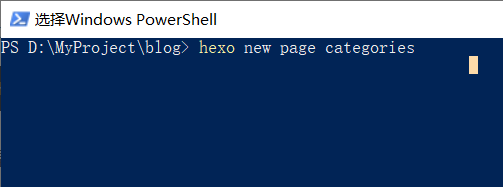
修改xxx.index文件
路径:在博客根目录source文件夹下
1 | // categories/index.md的文件内容如下: |
1 | // tags/index.md的文件内容如下: |
修改文章内容
找到你要加标签和分类的文章
1 | title: 薛之谦-演员 |
自动更换背景图
路径: 找到\themes\next\source\css_custom\custom.styl,如下修改内容
1 | // 自动更换背景 |
创建右上角github入口
找到\themes\next\layout\ _layout.swig文件
将以下内容添加至, <div class=”headband”></div>下面一行
1 | <a href="https://your-url" class="github-corner" aria-label="View source on GitHub"><svg width="80" height="80" viewBox="0 0 250 250" style="fill:#151513; color:#fff; position: absolute; top: 0; border: 0; right: 0;" aria-hidden="true"><path d="M0,0 L115,115 L130,115 L142,142 L250,250 L250,0 Z"></path><path d="M128.3,109.0 C113.8,99.7 119.0,89.6 119.0,89.6 C122.0,82.7 120.5,78.6 120.5,78.6 C119.2,72.0 123.4,76.3 123.4,76.3 C127.3,80.9 125.5,87.3 125.5,87.3 C122.9,97.6 130.6,101.9 134.4,103.2" fill="currentColor" style="transform-origin: 130px 106px;" class="octo-arm"></path><path d="M115.0,115.0 C114.9,115.1 118.7,116.5 119.8,115.4 L133.7,101.6 C136.9,99.2 139.9,98.4 142.2,98.6 C133.8,88.0 127.5,74.4 143.8,58.0 C148.5,53.4 154.0,51.2 159.7,51.0 C160.3,49.4 163.2,43.6 171.4,40.1 C171.4,40.1 176.1,42.5 178.8,56.2 C183.1,58.6 187.2,61.8 190.9,65.4 C194.5,69.0 197.7,73.2 200.1,77.6 C213.8,80.2 216.3,84.9 216.3,84.9 C212.7,93.1 206.9,96.0 205.4,96.6 C205.1,102.4 203.0,107.8 198.3,112.5 C181.9,128.9 168.3,122.5 157.7,114.1 C157.9,116.9 156.7,120.9 152.7,124.9 L141.0,136.5 C139.8,137.7 141.6,141.9 141.8,141.8 Z" fill="currentColor" class="octo-body"></path></svg></a><style>.github-corner:hover .octo-arm{animation:octocat-wave 560ms ease-in-out}@keyframes octocat-wave{0%,100%{transform:rotate(0)}20%,60%{transform:rotate(-25deg)}40%,80%{transform:rotate(10deg)}}@media (max-width:500px){.github-corner:hover .octo-arm{animation:none}.github-corner .octo-arm{animation:octocat-wave 560ms ease-in-out}}</style> |
侧边栏社交小图标设置

打开主题配置文件(_config.yml),搜索social_icons:,在fontawesome图标库(网址)找自己喜欢的小图标,并将名字复制在如下位置配置文件
1 | social: |
设置版权声明
实现下图效果
站点配置文件
找到站点配置文件,把url改为你自己的github访问路径
主题配置文件
找到主题配置文件,新增或修改为如下代码
1 | # 开启版权声明 |
添加顶部加载条
打开/themes/next/layout/_partials/head.swig文件,在maximum-scale=1”/>后添加如下代码:
1 | <script src="//cdn.bootcss.com/pace/1.0.2/pace.min.js"></script> |
但是,默认的是粉色的,要改变颜色可以在/themes/next/layout/_partials/head.swig文件中添加如下代码(接在刚才link的后面)
1 | <style> |